2021/04/05

  Wooden monitor stand with integrated usb hub
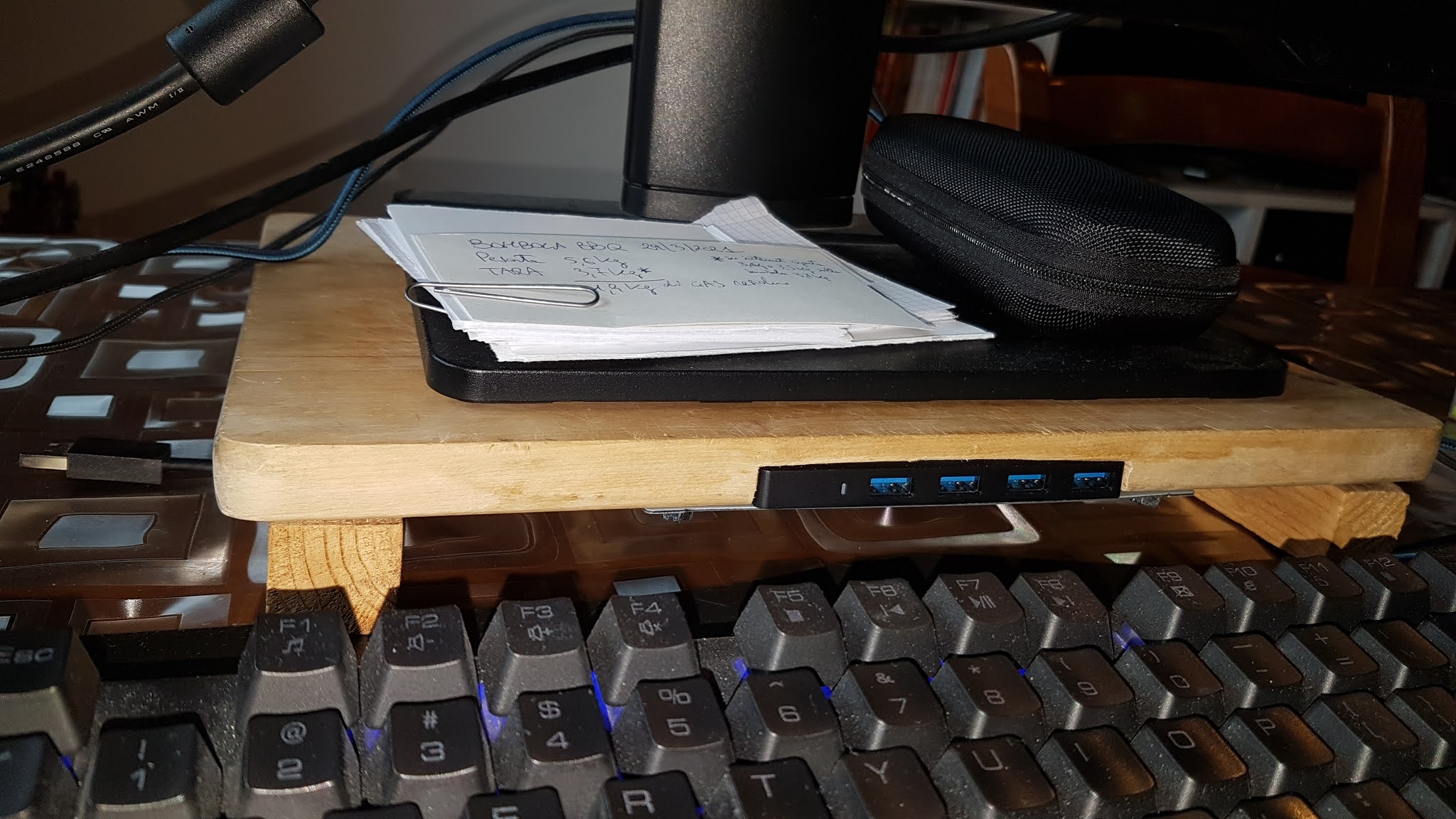


1. Place the hub on the wooden plank and mark the outline with a pencil. 

2. Begin the break-in with wood chisels and a hammer. 


3. When the dig is ready and the hub fits properly (better if it fits in a "tight" way) with a wood file and sandpaper, give it a smooth finish until the wood becomes smooth


4. Thoroughly clean any dust that might otherwise enter the hub's USB sockets 

5. place the hub in the cutout 


6. use a metal plate (iron, sheet metal, even a cut out beer can) I used a car stereo bracket that I found in the garage 

7. mark the points and drill a guide hole with the drill 


8. screw the plate so that the hub is firmly fixed, otherwise when you extract the usb devices you run the risk that the hub moves or even comes off 


9. in this way, without using glues, if you want to remove or replace the hub, just unscrew the screws.


10. I also made some grooves on the supports to keep the cables in order.

That's it! the hardest part is doing the cutout, take your time doing it. Total time of work (and fun...): 2h.

2020/07/17

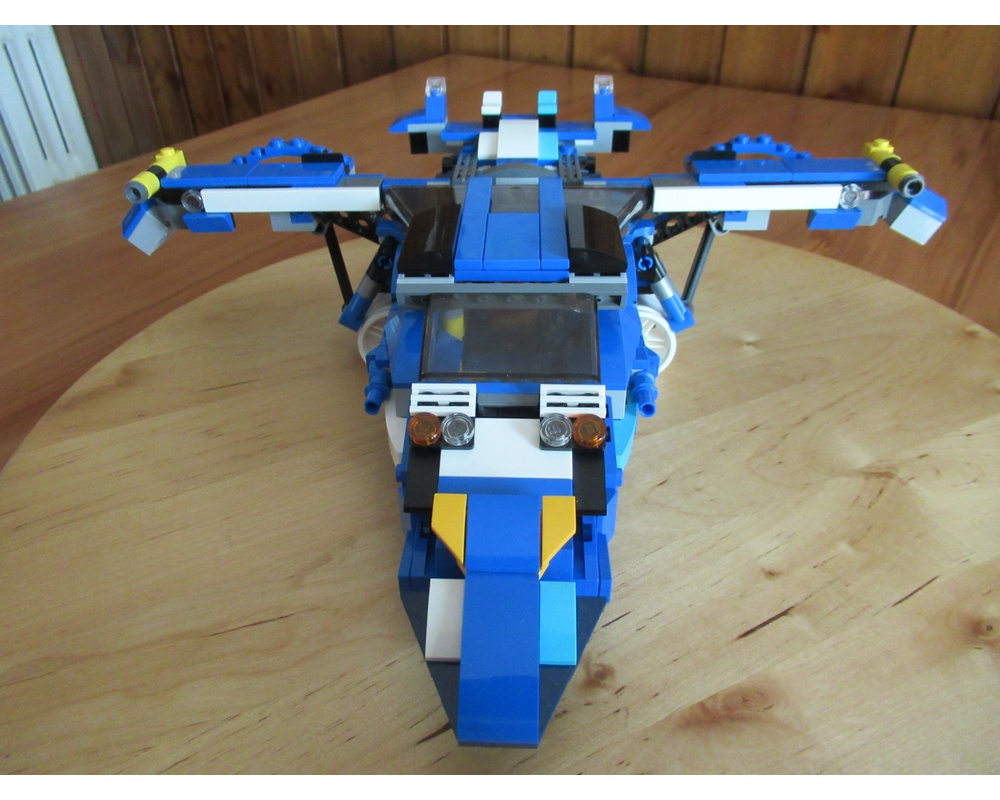
MOC - God Phoenix Jet - LEGO 31070 ALTERNATE BUILD - Turbo Track Racer - Model D


MOC-28916 God Phoenix Jet - SET 31070 ALTERNATE BUILD - Turbo Track Racer - Model D

"The God Phoenix is an aircraft used by the Science Ninja Team and is mainly piloted by Ryu, often serving as the main base of operations for the team."

We named it "God Phoenix" in honor of 1972 anime Gatchaman, whose Jet the model is inspired, and here it is the instructions to build this model.

It has an openable dome and inside there are two seats, with all the technical and scientific equipment


the hold is openable and inside there is a rover with a mechanical arm that can be controlled from inside the God Phoenix or by a pilot


the front can be unhooked and becomes a motorboat and there is a mechanism to rotate the propellers in a vertical position for vertical landing. The wings fold to provide stable support.

 The instructions are in PDF format and clear to follow


2011/12/18

Hide Windows of Running Programs


I love freewares, even more if they are Italian.

It's just out the latest version of TrayEverything, a program that in my view should be installed in every Windows machine.

Through TrayEverything you can minimize any window open in the system tray with a simple key combination.

Add to this the very useful function that allows you to hide icons in the tray to make "invisible" our work, then you will surely love this program.

If you wish to drive a "cofee break" but fear that a colleague watch your monitor, you can also set a password for both the software and for the minimized programs.

The author of this application is Max Galbusera.


2011/12/05

My Review of Sony ICF-DS11iP Clock Radio Docking Station

I bought this docking station a couple of weeks ago and I want to tell you what are the impressions that I got.


Basically it's a clock radio with digital radio presets and 6 (this function is very convenient because i don’t like to turn the wheel to go from one station to another), is fully equipped with two alarms configurable, A and B. It’s possible to configure each of the two alarms for working days at a time and for the weekend at a different time.


You can wake up with a buzzer or with the radio or your iPhone (or iPod). Very handy being able to set the alarm volume so don’t worry if during the day you listened to the radio too loud. There is snooze function, the display is nice and big and the brightness can be set to 3 different levels of intensity.


There is the remote, I thought it was a perfectly useless, but I had to change my mind, if the docking station is not within arm's reach (and that's my case) is convenient! ...because after I read a bit 'and I want to sleep, i don’t want having to move even an inch off the radio ...
There is a lithium battery that if the electric line go down don’t lose the time and setting alarms.


Meanwhile you listen to the iPhone (or iPod) yhe dock charge them, on the back there is an AUX input for any mp3 player.
The sound quality is the best I've ever heard in a clock radio, really good. Obviously NOT an HI-FI, so those looking for the purity of the sound or the depth of bass will look at other things and spend a looooot more ...


The only flaws I found are:
The menu navigation of the iPhone (I have a 3g) is purely sequential, if you select a playlist on the iPhone can only do play, stop, forward and back. I would have preferred more advanced features ...
The transformer is built into the plug and it is quite big, so if the plug is hidden behind the table consider that the plug-transformer has a reasonable footprint.


Overall, a purchase which I am very satisfied, from all points of view.

2011/11/20

How to upgrade Android 2.2 Froyo on Acer Liquid E


I've had to upgrade the version of Android pre-installed on thisbeautiful smartphone to solve some limitations of Android 2.1Eclair.


In particular, the fact that you can not move downloaded applications from the phone's internal memory to memory card.

In addition to this convenient feature, there are a number of improvements that I am not here to enumerate, but the improvements are a lot of ...

The upgrade procedure is very simple for anyone even who is not an expert:


1. go to the download section of the Acer site.

2. smartphone -> liquid -> Liquid E.

3. select as Android OS 2.2 Froyo.

4. go to the OS tab and download the latest version by looking at the date.

5. extract the contents of the downloaded ZIP file.

6. Make sure your smartphone is not connected to the computer.

7. Double-click the setup.exe file. Follow the onscreen instructions to install the updated software on your computer.After the installation is complete, the Software Upgrade Utility will start automatically.

8. Connect your smartphone to your computer using the USB sync cable. Once the smartphone has been detected, the software currently installed on the phone will be displayed in the Software Upgrade Utility. Click Next to begin the update.

9. When the installation is complete, click Finish and disconnect the phone from your PC.

Before you start upgrading, the software warns that the data will be overwritten on the phone and then you lose contacts and appointments, and various software installed. To me this is not happened, after upgrading all the numbers the appointments were ok, however, make a backup before updating the phone is a good idea.


2008/01/07

How to install Vista Sidebar on Windows XP


What beautiful windows Vista Sidebar! Want it too ...On XP!

You can do it... and in many ways! See some:

-- The Google Sidebar (here is a page of explanation, link 'features')
-- Yahoo Widget
-- DesktopSidebar

Personally, I try all 3 and I must say that the most graphically appealing are the Yahoo widget, that is really similar to Mac OS, even if I found them not very practical.

The solution proposed by Google resembles more to the concept of Vista Sidebar and has several gadgets but the graphic are weak and decisively not beatuful.

DesktopSidebar (in my view) is the best compromise between quality and design, at the end I choose this one and held only 5 panels (weather, images slideshow, stock market quotes, news and Quick Launch menu) and uninstalled others.

You what?

2007/12/27

Keep all bookmarks accessible from LAN and internet


Do you have a small home network?

Sometimes when i save as a favorite an interesting website, as this blog :-), for example in PC, and then, working and wanted to go to that site, I had to move on fixed PC because, obviously, bookmarks saved on pc and i'm working on laptop...


Do you want to keep all bookmarks accessible?

The extension del.icio.us Bookmarks for Firefox (must have an account on del.icio.us), share your bookmarks among all the computers on your network and not only, it's also accessible directly from Internet!

Then just add a site to favorites once and it will always available on any comupter we are using, on holiday or at work ...

To install, you only have to use Firefox as browser, follow this link, click install now and restart Firefox.

Here is a quick guide on how to use it, even if the operation is very intuitive and you can safely follow your nose.

W Firefox!

2007/12/26

Claim at Technorati

This is a post for claim this blog to Technorati with secure method...

Technorati Profile

VLC VideoLan, DivX XviD player on PS3 with YDL Linux


After install VLC Player i was able to play avi files over the network from NAT, from removable drive and from shared folder on Windows PC.

How it works? You need to log on as root on the blue screen and choose the gnome environment on your YDL.

I also find out that once you install VLC on gnome environment it will also run on the YDL enlightment environment, but gnome is more stable.

Step 1. Getting VLC Player installed onto the PS3, including all dependencies.

Download the 7zip file and use archive manager (default) to extract the 9 file in /etc/yum.repos.d you'll need to set the directory because it will try to download to the desktop.
Overwrite if necessary.

www.trofio.altervista.org/zip/therepos.7z

now open a gnome teminal and type

"yum update"

this will update your repositories.

Once its completed we will install VLC player simply by typing

"yum install videolan-client"

VoilĂ  your favourite video player!

PS: Now with firmware 2.10 our beast could read divx, but if you want play video from your LAN, Linux and VLC are required...

UTorrent, light client to download the torrent


If you need a client to download songs, movies and whatever (obviously not protected by copyright,) among many take uTorrent which has the peculiarity of being the smallest.

In only 170Kbyte of software we are all features necessary to open the torrent who are on various sites such as www.mininova.org etc ...

Another interesting feature is that uTorrent does not require installation and can work well even from a USB flash drive.

It's easy to configure, just download it and then double-click on the executable file. You will be asked to your speed connection and uTorrent is ready to open the torrent around the network.

For any clarification on the operation of this mechanism, you do not have to ask...

How to use BitTorrent?

Sometime friends tired to use e-mule or just curious to use BitTirrent ask me how it work, they say it's a bit complicated.

Not at all, in fact the only difference compared to the mule is that the research phase is done through special sites (here found a portrait of the best, in my opinion, of course!) instead of directly from the client program. But let's go with order:

1. Get one of the many clients 4 torrent and install (I like uTorrent, download and run without installation! But Azureus and so on are ok)

2. Go to the site torrent that prefer (list)

3. Look what you want and download the file, automatically uTorrent will start to download and share.

Really Simple and really peer-to-peer!

PS: if you want a software that search in hundreds of torrent sites in just 1 click try BitChe!

The best sites to download Torrent


Now they are 2 years that I left e-mule (the fact I never really used it..) for BitTorrent.

Before the BitTorrent client, and then Azureus recently uTorrent that I feel better because it is light, will do everything i need and function well.

I wish hold on sites that make available torrent to download, after a long search, I found the 4 that I consider the best:

www.mininova.org where there are a lot of films, television series and cartoon series .

www.meganova.org virtually identical to mininova but there is more music.

www.btjunkie.org that i use especially for gaming.

www.tntvillage.org perhaps the best, is a community of ethical trade, which pursues the objectives indicated by ScambioEtico.org (but a lot of material are in italian...)

Of course, this selection is absolutely personal, based on my experience of use and therefore questionable. In addition torrent sites born every day, so they are very welcome other reports.

Good work!

2007/12/25

Find torrent from multiple sites simultaneously


After a long absence for various reasons (not least a certain tiramjento ...) i go back to write something on the blog!

I wanted to report a very nice program that lets you search a lot of torrent sites (like mininova, mononova, mybittorrent, torrentspy and who has more will put more) with a single click, without even having to open the browser!

This wonder is called BitChe, when I started using it was completely free, now there are two versions, one with few restrictions and no.
However, the free version does everything that we needs without problems.

The Search is very simple, just enter the name of what you are interested in, and click "search" and then you can load the torrent directly with utorrent or another client.

PS: "Che" that appears in the name is in honor of Ernesto Che Guevara, a good reason to be used!

Hasta siempre comandante!